SSO allows users to authenticate with their existing company credentials instead of a separate Tresorit password.
Authentication and encryption in Tresorit
Tresorit stores the encryption keys required to access a user's content in an encrypted container called the user profile.
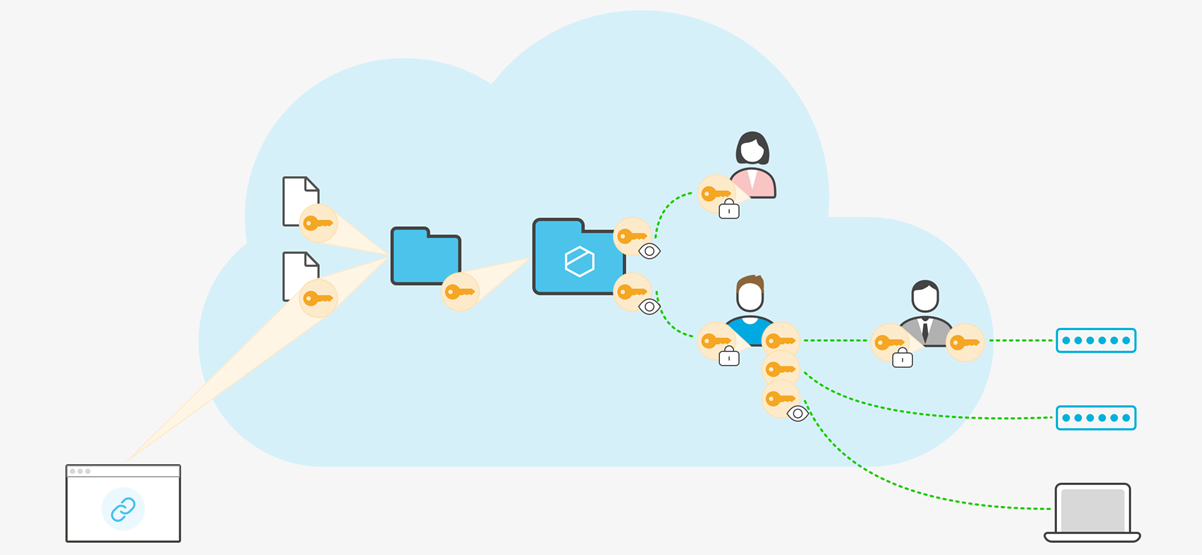
When a user signs in on a new device:
- The client authenticates with Tresorit.
- The encrypted user profile is downloaded.
- The user profile is decrypted locally on the device.
- The encryption keys become available to access the user's content.
This allows users to access their data from multiple devices while maintaining Tresorit's zero-knowledge architecture.
Standard password-based authentication
In password-based authentication, both authentication and user profile decryption are derived from the user's Tresorit password. The client generates separate cryptographic values:
- one for authentication
- one for decrypting the user profile
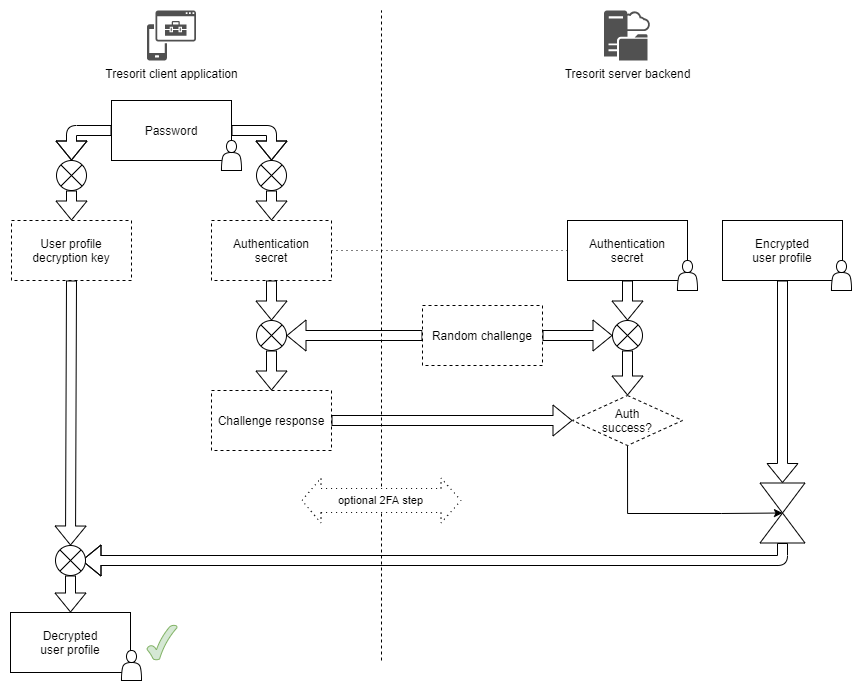
Because these values are derived using one-way cryptographic functions, the original password cannot be reconstructed. The password never leaves the device, and Tresorit never receives the keys required to decrypt user content.
SSO authentication
With SSO, users do not have a Tresorit password. Authentication is performed by the identity provider, which also provides access to the information required to decrypt the user profile.
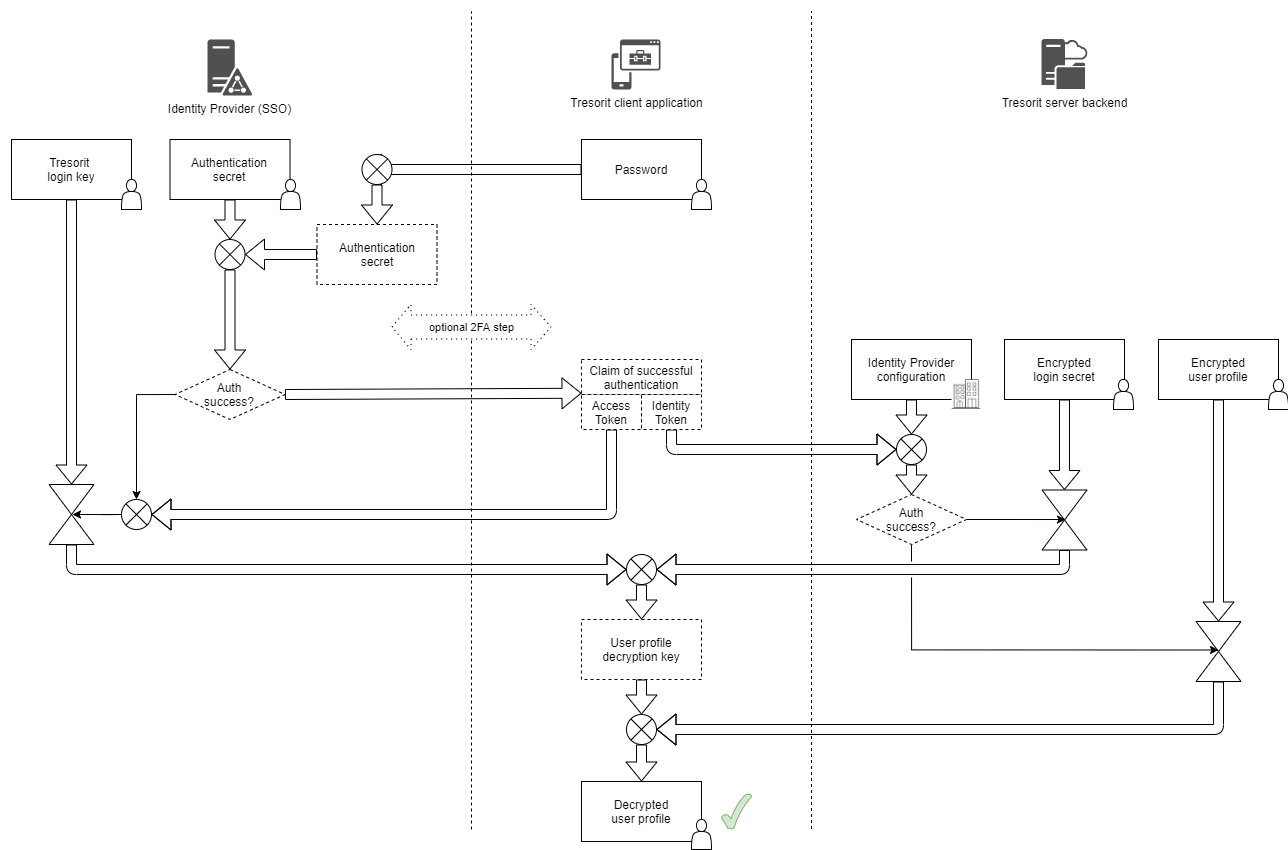
When a user signs in with SSO:
- The user authenticates on the identity provider's login page.
- The identity provider verifies the credentials and returns a signed SAML assertion.
- Tresorit validates the assertion and grants access to the encrypted account.
- Based on the established trust relationship, the client obtains the information required to decrypt the user profile.
Decryption continues to take place locally on the device. Tresorit does not receive passwords, plaintext encryption keys, or decrypted content.
Compared to password-based authentication, the trust model changes. Tresorit relies on the identity provider both to authenticate the user and to provide access to the information required to decrypt the user profile during sign-in.
Identity provider-specific considerations
| Azure AD | Stores SSO-related information in a user profile extension attribute. Access depends on Azure AD configuration and is controlled by directory permissions and assigned application access. |
| Google Workspace | Stores SSO-related information in a file (TresoritLoginKey) in Google Drive. Access is controlled by Google Drive sharing permissions and the access granted to users and applications. |
| Okta | Stores SSO-related information as a user profile attribute. Access is controlled by Okta’s role-based access model and the permissions defined by administrators. |
Infrastructure considerations
Tresorit's service infrastructure, including storage of encrypted user content, runs on Microsoft Azure. This may be a consideration when evaluating Azure AD as an SSO provider.
Risk mitigation
Organizations handling highly sensitive information can reduce SSO-related availability and recovery risks by using the following controls in Tresorit:
- Advanced Control – With Advanced Control, administrative actions still require the admin's Tresorit password, even when SSO is enabled. If access through the identity provider is lost (e.g. due to an IdP outage, account lockout, or account deletion), admins can use their Tresorit credentials to recover access and data. This reduces the risk of data inaccessibility due to SSO dependency.
- Selective SSO deployment – SSO can be enabled only for specific groups via policy templates. This allows limiting SSO to selected users while keeping others on password-based authentication, reducing reliance on the identity provider.